LangChain: practical overview from an LLM project
TL;DR (30 seconds)
- LangChain is a framework for building applications with Large Language Models (LLMs).
- It helps connect an LLM to prompt templates, multi-step flows (chains), memory, and external data (RAG).
- It becomes useful when a project needs more than one prompt and one response.
- Common use cases are chatbots, document Q&A, and simple agent workflows.
What is LangChain?
LangChain is an open source framework designed to build LLM-based applications in a structured way. Calling an LLM with one prompt can work for quick tests, but real projects usually need extra pieces:
- Reusable prompts
- Multi-step flows
- Chat context
- Retrieval from documents or a database
- Tool usage when needed
LangChain helps connect these pieces without everything turning into scattered scripts.
Why not just call the LLM API directly?
Direct API calls are fine in the beginning. But as soon as the project grows, a few things start to matter more:
- Keeping prompts consistent across the project
- Making the workflow readable
- Adding retrieval so answers are grounded in documents
- Keeping context across chat turns
- Debugging issues without guessing what went wrong
This is where LangChain fits well.
Main building blocks
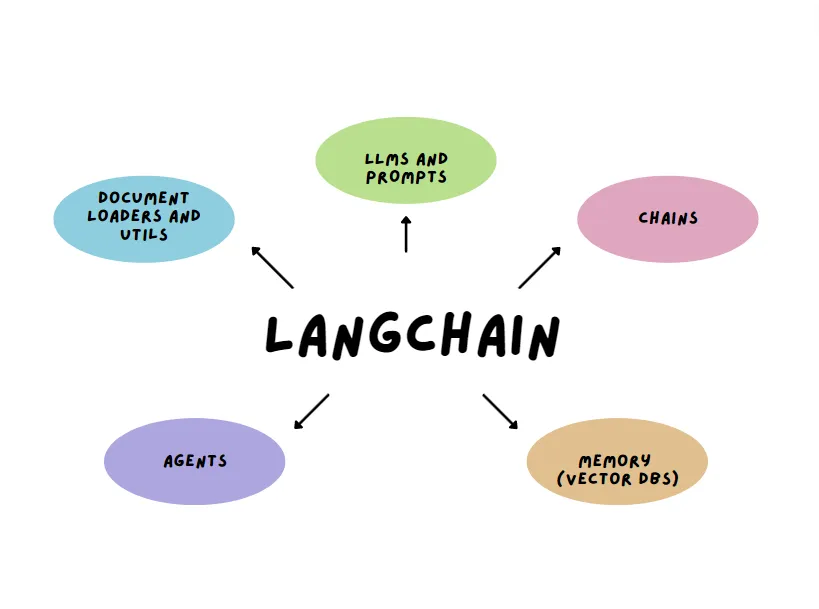 Image from the web
1) Models and embeddings
LangChain supports using LLMs for generation, and embeddings for semantic search. Embeddings are important for retrieval, because they help find relevant text by meaning, not just keywords.
2) Prompt templates
Prompt templates keep prompts consistent. Instead of rewriting the same style again and again, the template approach makes updates easier later.
3) Chains (multi-step workflows)
Chains are basically a clean way to represent a workflow with multiple steps. A common pattern looks like:
- Take a user question
- Retrieve relevant context
- Generate an answer using that context
- Return the final response
Having the flow defined clearly also makes debugging easier.
4) Memory
Memory is useful in chat-style apps because it keeps context across turns. Without memory, the assistant acts like each message is a new conversation. With memory, it can stay aligned with the ongoing discussion. Still, memory should be used carefully so it does not bring old, irrelevant context into new answers.
5) Retrieval-Augmented Generation (RAG) and vector stores
RAG is one of the most practical ideas in LangChain. Instead of asking the model to answer from guesswork, the system retrieves relevant chunks from documents first, then uses them as context for the answer.
To do that, the text is converted into embeddings and stored in a vector store. A vector store is a database built for similarity search, so it can quickly return the most relevant chunks for a query.
Typical flow:
- Split documents into chunks
- Create embeddings for each chunk
- Store embeddings in a vector store
- Retrieve the most relevant chunks for a question
- Send the retrieved context to the LLM
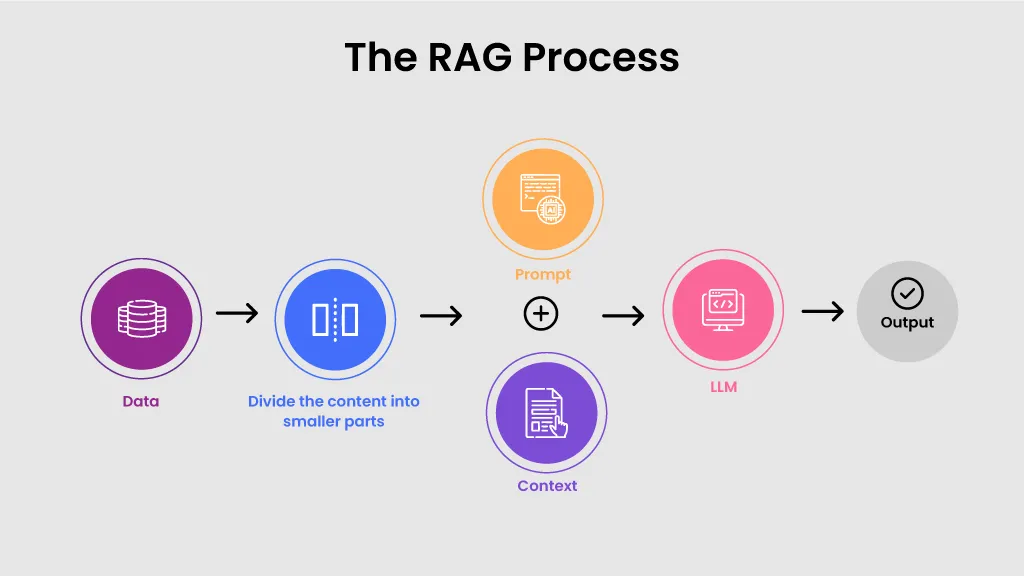 Source: https://ceptes.com/blogs/what-is-rag-retrieval-augmented-generation-a-detailed-overview/
RAG quality depends a lot on chunking, embeddings, and metadata. Even strong models do not help much if retrieval is weak.
6) Agents and tools
Agents are useful when an application needs to decide what to do next, like answering directly, retrieving more context, or using a tool such as search, a calculator, or a database query. Not every project needs agents, but they can be helpful when workflows become more complex.
Benefits in real projects
LangChain helps when the goal is to build something maintainable:
- Prompts and logic stay more organised
- Retrieval-based answers feel more reliable
- Components can be improved without rewriting everything
- Workflows are easier to explain and test
Trade-offs
A few things to keep in mind:
- The ecosystem changes fast, so some older tutorials may be outdated
- Abstractions can hide details, so understanding the basics still matters
- For a tiny script, it can feel like extra setup
When to use LangChain
Good fit when: LangChain fits well when building a chatbot with multi turn context, doing document Q&A with RAG, setting up multi step workflows, or connecting tools to the model as part of the flow.
Less needed when: It is usually not needed when the task is only one prompt and one output, or when the project is small and does not require retrieval or memory.
Resources
- LangChain docs: https://python.langchain.com/
- Concepts overview: https://python.langchain.com/docs/concepts/
- Tutorials: https://python.langchain.com/docs/tutorials/
- RAG tutorial: https://python.langchain.com/docs/tutorials/rag/
- Integrations: https://python.langchain.com/docs/integrations/
- GitHub repository: https://github.com/langchain-ai/langchain
Conclusion
LangChain is helpful when an LLM project becomes more than a single prompt. It brings prompts, retrieval, memory, and tools into a clearer workflow, which makes the application easier to improve and maintain.
Ayesha Munir — Software Engineer | Artificial Intelligence (MSc)